Thursday, 31 March 2011
Final Video


Tuesday, 29 March 2011
Final Cut
 +
+
We decided to use Final Cut for our media production, on the shots which can be seen here. We decided to layer these shots, so that we had one ontop of the other; however this proved to be very difficult and ended up changing our whole production by compressing the shots and becoming slightly closer. This meant that our establishing shot now had half of the writing cut off. However, after speaking with Mike we realised that the writing at the start of music videos is not a convention of music videos, but instead the broadcaster's individual input - therefore we decided that it does not actually matter whether the writing is cut off, and as it was too late to delete the writing completely, we had to keep it on. However, we did manage to layer the two shots, after realising that it was in fact easier than we had first anticipated, all we had to do was right click the shot and click "overlay". Therefore we have now managed to layer our shots, and our production is completely finished - along with ancillary texts.


Thursday, 24 March 2011
Poster & Digipack
Our Digipack proved to be much more difficult, as it would not work on publisher, so we had to use Microsoft Word, somehow we managed to pull it off without reducing the quality of the pictures, and we included the conventions such as including the executive producer (and other companies involved with the production of our video, digipack and poster) in small font on the reverse side of the digipack. We also made sure we included a barcode on our digipack, to create a sense of verisimilitude.
Overall we were very impressed with our ancillary products as we had to improvise with the programming due to our audience feedback and the most popular fonts. We were not expecting such a good result from the Microsoft programmes, and these will be uploaded very soon.
Sunday, 6 March 2011
February
Tuesday, 18 January 2011
Editing
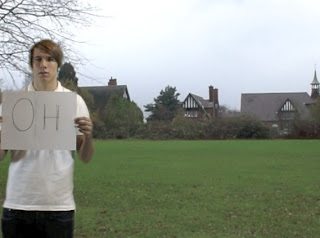
After we had done this we saved it, and opened it up within the same project, which meant that we could put a new green screen shot over the top. So it now looked like this:
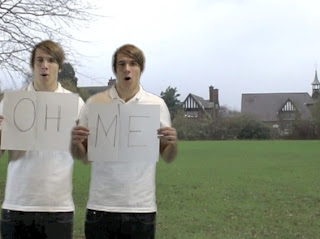
We then repeated the previous step until we had the four males so th
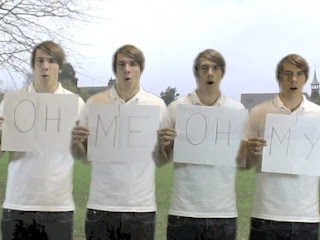 ey gradually added onto the end. Our final shot looked like this:
Overall we were very happy with how this turned out, as we were unsure as to how the final result would look. We edited the contrast and brightness of the shots because his jeans change slightly (which can be seen in the above screen grab) so now our shots looked very realistic and it is almost impossible to tell that we have used the greenscreen effect. The final result can be seen on our final video when everything has finished being edited.